Follow a competitor's ASIN
and know who has the Buy Box
What Competitor Tracker is. A check you set up on any ASIN, including one you do not sell: choose what to watch and the threshold, and we only write when the condition is met.
Official SP-API connection Data encrypted (TLS 1.2+) Amazon Software Partner Revoke anytime
Seven-day trial, on the daily check and up to a thousand slots. Nothing to install.
Social proof and trust signals
10
Checks you can set up
3
Check rates: every 24h, 8h or hour
Any
ASINs, including ones you do not sell
All
The marketplaces you connected


About the product you care about, you only know what you can see right now
You open the listing, check the price, count the sellers, close it. Tomorrow something will have changed and you will not know, unless you open the page again. Yesterday's price, the day they ran out of stock, the moment the Buy Box changed hands: those are the facts you need to decide, and they are exactly the ones nobody has.
- You buy at the wrong price.You look at the listing on the day the price is high and assume that is normal.
- You miss the window.The competitor is out of stock for four days and you notice on the fifth.
- You do not know who runs that listing.Who holds the Buy Box, since when, and how often they lose it.
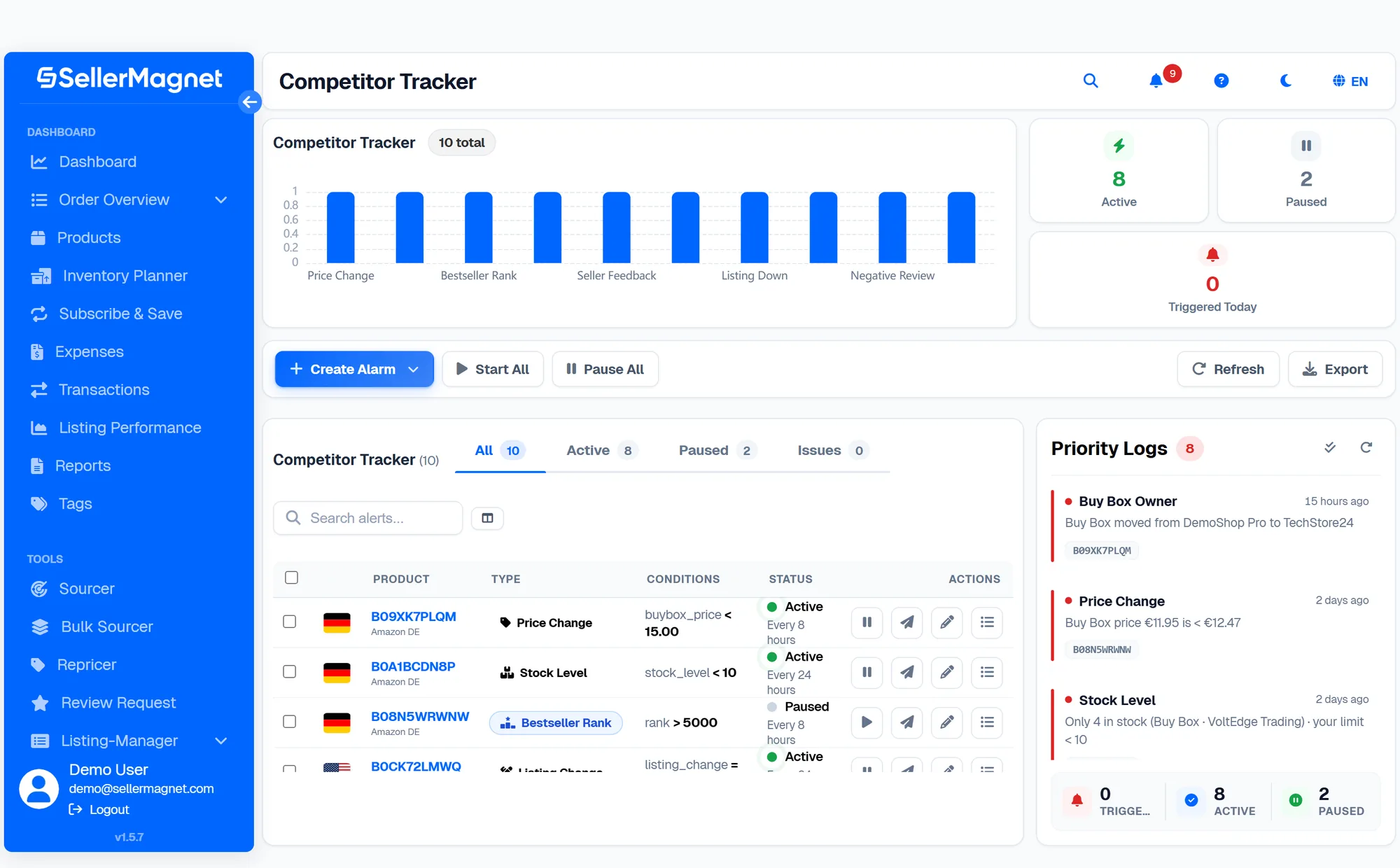
Four ready-made starting points
- Who holds the Buy Box.The most asked-for template: it tells you when it changes hands.
- A competitor running out of stock.On the units still purchasable, with the threshold you choose.
- Bestseller rank.The rank leaving the range you decided.
- From scratch.Pick the type, the condition and the threshold, if none of the three fits.
Ten things that move on a listing, and that you can keep an eye on
-
Buy Box.
When it changes hands. It is the question a tracker exists to answer: who runs that listing, and since when.
-
Price.
Buy Box price, lowest offer, or a percentage move: three different thresholds on the same product.
-
Number of sellers.
How many are on the listing, including the ones that have just arrived.
-
Feedback of the Buy Box holder.
The positive-feedback percentage of the seller holding the Buy Box at that moment.
-
Stock.
How many units can still be bought: it is the sign that a competitor is running dry.
-
Listing unreachable.
When the page disappears or is suppressed. Their problem is your window.
-
Bestseller rank.
The rank leaving the range you chose: the earliest sales signal Amazon gives you about a product.
-
Average rating.
When it falls below the threshold you set.
-
Negative reviews.
When new ones land while the average falls: a rival taking a wave of bad reviews, as it happens.
-
Listing edits.
Title or main image changed. We tell you after two checks that say the same thing, not the first, because Amazon sometimes returns incomplete data.
Under a minute for the first one, and the rest are copies
-
What you want to watch.
Pick the type: price, Buy Box, sellers, availability, rank, reviews, listing edits.
-
On which product.
Country and ASIN. It does not have to be one of yours.
-
On what condition.
A value, a threshold crossed, or a percentage move. You can set more than one, though one is usually enough.
-
Where you want to hear it.
Email and dashboard.
Twenty trackers are as easy to run as one
-
Filters by state.
Active, paused, and the ones with a problem.
-
Bulk selection.
Start, pause or delete in one go, without opening them one by one.
-
Columns you choose.
See what you need and hide the rest.
-
Pause and resume.
A seasonal product gets paused instead of deleted and rebuilt.
-
Export.
To take the list out, or into a report for a client.
You can see what fired, and when
-
How many are active, paused, and fired today.
At the top of the page, without opening anything.
-
The log of every check.
With the outcome of each pass, so you know it is running even when nothing happens.
-
The panel of alerts to read.
The same alert stays in the dashboard, and you mark everything as read when you are done.
Competitor Tracker
How we tell you
-
The email, when the condition is met.
With the product, the condition and the value that triggered it.
You pay for what we check
One ASIN on one marketplace, at the frequency you choose: once a day, every eight hours or every hour. If you follow the same product in Italy and in Germany that is two checks, because those are two listings with two prices and two sets of competitors.
When you reach the size you picked, we tell you while you are creating the tracker, not at the end of the month on the invoice.
What Competitor Tracker costs
Hand-picked competitor listings: who sells, who holds the Buy Box, prices, undercuts and stock signals.
What you get
- Pick the ASINs and marketplaces yourself
- Daily, 8-hourly or hourly checks per task
- Exportable report, email and in-dashboard alerts
What about the products I sell myself?
For your own catalogue there is no sense in creating checks by hand, one at a time. The other module handles that: it takes your products from the account and watches all of them, by itself, every day.
See Offer WatchWho uses it, and for what
Arbitrage and wholesale
Before you buy, you watch for two weeks how the price really moves and how many sellers there are. After you buy, you know when someone breaks the price.
Brands watching rivals
Two or three competing products kept under watch: when they run out of stock, when they change the title, when their rating slips.
Agencies
One panel for client products and their competitors, with the export ready for the monthly report.
Frequently asked questions
Do I have to sell the product I want to follow?
No. You can follow any ASIN in any of the countries you manage, including one you have never sold.
How many products can I follow?
As many as the size you pick. The count is per product and per country: the same ASIN on two marketplaces counts as two.
How often do you check?
Once a day by default. If you need it more often you can move to every eight hours or every hour.
What conditions can I set?
A value to pass, a threshold to cross, or a percentage move. You can set more than one on the same tracker.
Can I pause them?
Yes, one at a time or all together, and you resume them without reconfiguring anything.
How does the alert reach me?
By email and in the dashboard, where the history of every time it fired also stays.
What is the difference with Offer Watch?
Here you choose the products yourself, one by one, with your own thresholds. Offer Watch takes your catalogue from the account and watches all of it automatically. One is for looking outward, the other for defending what is yours.
Can I try it before paying?
Yes, during the trial, on the daily check and up to a thousand slots: a thousand products followed on one marketplace, or two hundred across five. If you need more, we will set up a trial that fits.
What happens if I try to go past the size I bought?
We tell you while you are creating the tracker, not at the end of the month. So you decide right there whether to free one up or move up a size.
Pick the first product
and see what happens
The product you are looking at moves either way: the price changes, the stock runs out, the seller changes. The difference is whether you find out while it happens, or after you have already made the decision.
Cancel whenever you want. No lock in.
