Amazon monitoring: know who lands on your listings
and what your competitors are doing
Offer Watch checks everything you sell by itself and tells you who else arrived on your listings. Competitor Tracker follows the ASINs you pick, including ones that are not yours, on the conditions you set.
What is included and what you buy. Receiving the alerts is included in your plan: they reach you by email, in the daily report and inside the dashboard, in your language. What you buy is the watching, the work of checking the listings for you, day after day. That is what costs: every listing has to be read and compared with how it was yesterday, every day, in every country.
During the trial you use both. Cancel whenever you want.
Seller Central tells you what happened to you, not what changed around you
Your account reports your orders, your stock, your refunds. It does not tell you that another seller showed up on your listing this morning, that your price is no longer the lowest, or that the product you were considering has run out of stock. That information is public, visible to anyone who opens the page. The catch is that nobody has time to open all of them, every day.
- You find out later. By the time the numbers look wrong, the damage is done.
- You always check the same three listings. Nobody opens the rest.
- What you saw yesterday is gone. Without someone keeping the record, there is nothing to compare.
Two ways of watching, for two different questions
Offer Watch
Who else is selling your products
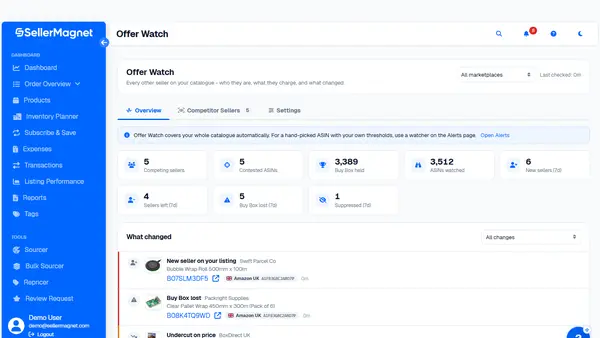
You connect the account and from then on you choose nothing. Every day we check your whole active catalogue, across every connected marketplace, and tell you what changed: who arrived on your listings, at what price, who took or released the Buy Box, which listings were suppressed.
See how Offer Watch works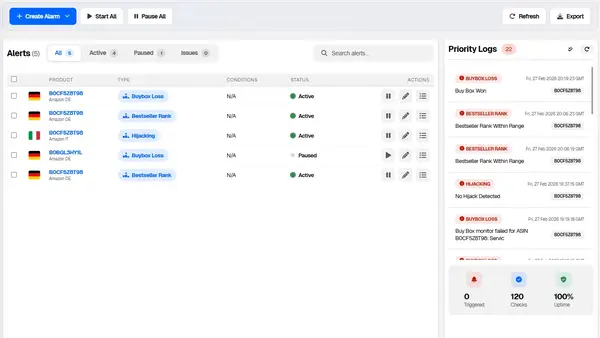
Competitor Tracker
The product you want to keep an eye on
Pick an ASIN, including one you do not sell, set the condition you care about and we alert you when it happens. Buy Box, price, availability, number of sellers, bestseller rank, reviews, listing edits.
See how Competitor Tracker worksWhich one you need
| Offer Watch | Competitor Tracker | |
|---|---|---|
| What it watches | everything you sell | the ASINs you pick, including ones that are not yours |
| Who decides what to watch | nobody, we find it from your catalogue | you, one by one, with your own thresholds |
| The question it answers | who else is on my listings, and what changed | what is that product doing |
| When you use it | you have a catalogue and want to defend it | you are sizing up a product, or following two or three rivals |
Plenty of sellers run both, and that is the case where the two lines together cost less.
Alerts arrive where you already read
Delivery is not charged separately and works the same for both modules.
Email, in your language
One email, ordered by what the event costs you, not by the order things arrived in.
The daily report
Everything that changed in a single read, at the hour you choose.
The dashboard
The full history, filterable and exportable, whenever you want to go through it properly.
You decide which alerts reach you straight away and which can wait for the summary.
You pay for what we watch, not for what we send you
The unit is simple: one ASIN on one marketplace, at the frequency you choose. The same product sold in five countries is five real listings, with five different sets of competitors and five different Buy Boxes, so it counts as five.
- Three cadences. Once a day, every eight hours, every hour. You choose how fast you want to be and pay for that, because checking a listing every hour means reading it twenty four times a day instead of once.
- No ASINs included in the plans. A twenty five listing allowance would be invisible to someone with three thousand, and would cost us the same as any other. Better not to have one, and to charge only the people who use it.
- Together they cost less. If you hold both modules, a discount applies to the combined total of the two lines.
Two things we would rather tell you now
We do not promise real time, and we would rather tell you why.
-
We look once a day, which is why we do not promise instant. Tighter cadences exist and can be bought, but what the base cadence includes is one check a day, said plainly. The exception is anything Amazon reports to us: that reaches you straight away.
-
For reviews we see the count and the average, not the text. Amazon does not expose it to anyone. So we tell you when your rating falls, and by how much, not what the customer wrote.
Who uses it, and for what
Brands and private label
The problem is sellers latching onto your listings. Offer Watch finds them without you looking, and your authorized resellers do not make your phone ring.
Resellers and arbitrage
The problem is the margin moving underneath you. Price, number of sellers and availability on the products that matter, before you buy and after.
Agencies and multiple accounts
Every client and every marketplace in one panel, with an export ready to drop into a report.
Frequently asked questions
What is the difference between an alert and the watching?
The alert is the message you receive, and receiving messages is included in your plan. The watching is the work that comes first: checking the listings, comparing them with how they were the day before and working out what changed. That is what you buy, and that is what costs.
How long does it take to get going?
You connect the Amazon account and there is nothing to install. Day one builds the baseline of your listings, so you do not get an alarm for every seller who had been there for months. From the next day you only get what changed.
Which of the two modules do I need?
If the question is who else is selling my products, Offer Watch. If it is what is that product doing, Competitor Tracker. If you ask yourself both, taking them together costs less than separately.
Why is it counted per marketplace and not per product?
Because the same ASIN in Italy and in Germany are two different listings, with different sellers, different prices and a different Buy Box. Checking them is two jobs, not one.
Can I try them before paying?
Yes. During the trial you can use both, on the daily check, up to a thousand slots. A thousand slots means a thousand ASINs on one marketplace, or two hundred ASINs across five: the count is always product by country. If your catalogue is bigger and you want to try them across all of it, we will set up a trial that fits.
Does it work across marketplaces and multiple accounts?
Yes, all the ones you connect, in one panel and one summary email.
What happens if I go past what I bought?
It depends on the module, and with neither do you find out at the end of the month. On Offer Watch nothing switches off: the excess keeps being checked once a day and we suggest the size that fits. On Competitor Tracker the limit shows when you create the tracker, so you decide right there.
Does my data stay mine?
Yes. The connection is Amazon's official one, with only the permissions needed, and you can revoke it from Seller Central whenever you want.
Connect it once,
then you know first
The next seller landing on your listing lands there either way. The difference is whether you find out the next day or when the month's numbers do not add up. Connect the account once, and from then on we tell you.
Cancel whenever you want. No lock in. Your data stays yours.
